
The Kubernetes scheduler makes one decision for each pod. It picks a node when the pod is created, records that choice on the pod, and never looks at the pod again. If the cluster changes after that moment, the pod stays where it is, even when the original choice no longer makes sense.
The Kubernetes descheduler exists for that gap. It does not place pods. It finds running pods whose placement breaks a policy, evicts them, and lets the normal scheduler place them again with the cluster as it looks now. This article explains where placement drifts, what each descheduler strategy corrects, which pods it refuses to evict, and where it can loop or fight with other controllers.
Why Placement Drifts After a Pod Is Running
Scheduling rules are checked at one point in time. After a pod is bound to a node, most of those rules are not checked again. The project's own documentation lists the usual causes: new nodes are added, nodes fail and their pods move elsewhere, and taints or labels change after pods were already placed.
New nodes join a cluster that is already packed
When a node group scales up or a node is added, the scheduler uses the new capacity only for pods that are created afterwards. Pods already running on busy nodes stay there. The new node can stay mostly empty while older nodes remain full.
Affinity and taints change after scheduling
A pod with requiredDuringSchedulingIgnoredDuringExecution node affinity has to match a node label at scheduling time. If that label is removed later, the kubelet ignores the change and the pod keeps running. A NoSchedule taint works the same way. It blocks new pods that do not tolerate it, but pods already on the node are left alone.
Topology spread is enforced only at scheduling time
Topology spread constraints control how pods spread across zones or nodes. AWS guidance for EKS points out that Kubernetes applies them only at the scheduling stage, so pods can become unbalanced later. A constraint with whenUnsatisfiable set to DoNotSchedule is a hard rule: a pod that would break maxSkew stays Pending. ScheduleAnyway is soft and acts as a scoring preference. Neither one moves a pod that is already running.
After a rolling update, a node failure, or a zone coming back from an outage, a Deployment can end up with most of its replicas in one zone while its constraints look correct on paper.
What the Descheduler Does and Does Not Do
The descheduler only evicts pods. According to its own documentation, it does not schedule replacements and relies on the default scheduler for that. The sequence is short. The descheduler evicts a pod, the owning controller such as a Deployment or ReplicaSet creates a replacement, and the scheduler picks a node for it using the current state of the cluster.
It can run as a Job, a CronJob, or a long-running Deployment. Each run reads a policy, evaluates the cluster, and evicts what the policy allows. The descheduler pod itself runs as a critical pod in the kube-system namespace, so neither the descheduler nor the kubelet evicts it. Evictions go through the Kubernetes eviction API, so PodDisruptionBudgets are respected. If an eviction would break a budget, it is refused and that pod is skipped.
How the Policy Is Written
Current versions use the descheduler/v1alpha2 policy API. A policy contains one or more profiles. Each profile holds plugin configuration and then switches plugins on under either deschedule or balance. Deschedule plugins look at pods one by one and evict the ones that violate a rule. Balance plugins look at groups of pods and evict based on group size.
| # Rebalance by memory: move pods off heavily loaded nodes apiVersion: "descheduler/v1alpha2" kind: "DeschedulerPolicy" profiles: - name: ProfileName pluginConfig: - name: "LowNodeUtilization" args: thresholds: "memory": 20 targetThresholds: "memory": 70 plugins: balance: enabled: - "LowNodeUtilization" |
In this example, nodes below 20 percent memory are treated as places pods can move to, and nodes above 70 percent are treated as places pods should move from. Pods are evicted from the second group in the hope that they land on the first.
Two details decide whether this behaves as expected. By default, node load is calculated from pod resource requests and not from live usage, so a cluster with inflated requests looks busier than it is. The strategy also aborts when either group is empty, since there is nowhere to move pods from or to.
The Strategies, Grouped by What They Fix
Each strategy is a plugin, and each targets one specific kind of drift.
| Strategy | Type | What it corrects |
|---|---|---|
| LowNodeUtilization | Balance | Evicts pods from heavily loaded nodes so they can land on lightly loaded ones |
| HighNodeUtilization | Balance | Evicts pods from lightly loaded nodes so they pack onto fewer nodes |
| RemoveDuplicates | Balance | Spreads pods of the same owner that landed on the same node |
| RemovePodsViolatingTopologySpreadConstraint | Balance | Evicts pods from larger domains to bring skew back within maxSkew |
| RemovePodsViolatingInterPodAntiAffinity | Deschedule | Evicts pods that now break pod anti-affinity |
| RemovePodsViolatingNodeAffinity | Deschedule | Evicts pods whose node no longer matches required node affinity |
| RemovePodsViolatingNodeTaints | Deschedule | Evicts pods on nodes with NoSchedule taints they do not tolerate |
| RemovePodsHavingTooManyRestarts | Deschedule | Evicts pods that keep restarting, so they get a fresh placement |
| PodLifeTime | Deschedule | Evicts pods older than a set age |
| RemoveFailedPods | Deschedule | Evicts pods in a failed state for chosen reasons |
HighNodeUtilization needs a different scheduler score
HighNodeUtilization works against the default scheduler. It empties lightly loaded nodes so that an autoscaler can remove them, but the default scheduler scores nodes with the LeastAllocated strategy, which prefers nodes with more free resources. Left alone, the scheduler tends to place evicted pods back where they came from.
The project documentation is direct about this. The strategy must be used with the MostAllocated scoring strategy of the NodeResourcesFit scheduler plugin. A maintainer-confirmed issue in the project tracker describes what happens without it: pods are evicted successfully and then land on the same node again. On GKE, where the default scheduler configuration cannot be changed, the README points to the optimize-utilization autoscaling profile, or to a second custom scheduler with its own configuration.
Eviction order inside the utilization strategy
In LowNodeUtilization and the inter-pod anti-affinity plugin, pods are evicted from lowest priority to highest. Among pods of equal priority, BestEffort pods go before Burstable and Guaranteed ones. This is a practical reason to set priority classes deliberately, since they decide which pods are moved first
The topology plugin and soft constraints
By default, the topology plugin acts on hard constraints only. That leaves out a large share of real workloads. Many teams write ScheduleAnyway constraints, and Kubernetes itself uses ScheduleAnyway in its default cluster-wide spread settings. Those constraints drift without the plugin ever noticing. The plugin accepts a list of constraint types, and adding ScheduleAnyway makes it act on soft constraints as well.
| Act on hard and soft topology spread constraints apiVersion: "descheduler/v1alpha2" kind: "DeschedulerPolicy" profiles: - name: rebalance-topology pluginConfig: - name: "RemovePodsViolatingTopologySpreadConstraint" args: constraints: - DoNotSchedule - ScheduleAnyway plugins: balance: enabled: - "RemovePodsViolatingTopologySpreadConstraint" |
The AWS guidance on this drift adds that violations are evaluated per workload, so each Deployment is checked against its own constraint and not against the cluster as a whole.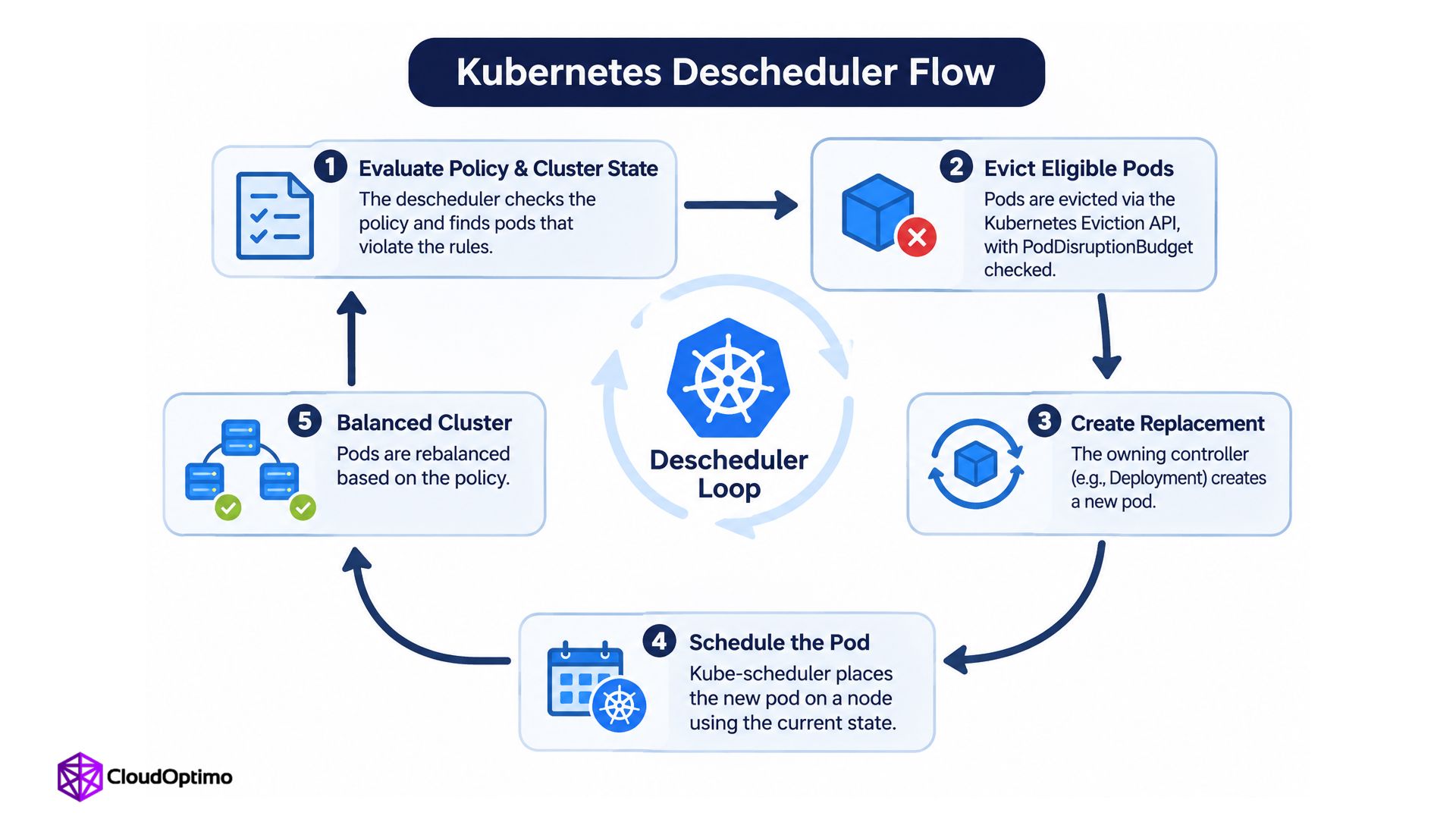
Which Pods It Refuses to Evict
Before any strategy acts, the default evictor filters out pods that should not be moved. Unless configured otherwise, it skips these:
- Pods with priorityClassName set to system-cluster-critical or system-node-critical
- Pods owned by a DaemonSet
- Pods that use local storage
- Static, mirror, and standalone pods that no controller would recreate
- Pods that are already being deleted
These protections can be changed through the podProtections setting, and the older boolean flags such as evictLocalStoragePods are deprecated in its favour. Other controls narrow the scope further: a priority threshold, a minimum pod age, namespace include and exclude lists, and a node fit check that confirms another node can take the pod before it is evicted. A pod can also carry the annotation descheduler.alpha.kubernetes.io/evict to make itself eligible.
One case needs attention. A Deployment with a single replica and no PodDisruptionBudget can be evicted. The pod is deleted first and the replacement starts afterwards, so there is a short gap in service. A PodDisruptionBudget turns that eviction into a refusal.
| Before enabling any strategy: Create a PodDisruptionBudget for every workload that has to stay available. The descheduler uses the eviction API, and a budget is the main signal it has for how much disruption a workload can take. |
Two Uses Beyond Rebalancing
Healing node problems
The project user guide describes an autohealing cycle built from three parts. Node Problem Detector reports a fault and the node is tainted. The RemovePodsViolatingNodeTaints plugin evicts the workloads that do not tolerate that taint. Cluster Autoscaler removes the node once it is empty. None of the three needs to know about the others. Each reacts to the state the previous one leaves behind.
Cycling old pods
PodLifeTime evicts pods that have passed a set age. The user guide presents it as a way to make sure old pods are evicted, and recommends a PodDisruptionBudget for each application so availability holds while pods are replaced. Replacement pods are placed by the normal scheduler, so every cycle also gives a pod a new placement decision made with current cluster state.
Where It Goes Wrong
Eviction loops
The descheduler evicts a pod, the scheduler places it back on the same node, and the next run evicts it again. This happens when the descheduler's policy and the scheduler's own scoring disagree, or when no better node exists. Every cycle restarts the pod for no gain. The node fit check helps here, because it skips pods that cannot fit on any other node.
Node fit is an approximation, though. It reimplements part of the scheduler's logic, and it cannot know about custom scheduler profiles or later changes to the scheduler configuration. A third-party analysis of the plugin code and discussion in the project issue tracker both make this point, and the tracker discussion adds that copying every scheduling rule into the descheduler is not realistic. Loops can therefore still occur after node fit is enabled, and the logs remain the way to confirm it.
Plugins that pull in opposite directions
The AWS containers blog on topology drift advises against running the topology plugin together with LowNodeUtilization at first. One spreads pods across zones while the other consolidates them onto fewer nodes, and together they can oscillate. OpenShift's descheduler operator goes further: some of its profiles cannot be enabled together at all and are reported as a conflict.
Evicting too much at once
A policy that matches many pods can evict many of them in the same run, and every replacement then competes for the same resources. Top-level limits such as maxNoOfPodsToEvictPerNode and maxNoOfPodsToEvictPerNamespace cap how much disruption a single run can cause.
Descheduler and Karpenter Consolidation
AWS prescriptive guidance for EKS lists two ways to rebalance pods: the descheduler, or Karpenter consolidation and bin-packing. It recommends the descheduler for clusters that are not using Karpenter, and notes that it can also be paired with Cluster Autoscaler on node groups.
The overlap is specific. HighNodeUtilization tries to empty lightly loaded nodes by moving their pods elsewhere, which is the same goal consolidation pursues. Consolidation acts on the nodes themselves and can remove an emptied node afterwards. Running both against the same nodes means two controllers disrupt pods for the same reason on different schedules.
A reasonable split follows from that. Where Karpenter consolidation is enabled, the utilization plugins add little. The topology and affinity plugins still target drift that consolidation does not aim at, so they stay useful on any cluster that relies on spread rules.
A Safer Way to Roll It Out
- Start with one plugin, in dry run mode, so the logs show what would be evicted without evicting anything.
- Compare that list with the workloads involved, and look for single-replica Deployments that have no PodDisruptionBudget.
- Set eviction limits per node and per namespace before the first real run.
- Pick a run interval that gives the scheduler time to settle between runs.
- Watch the descheduler's Prometheus metrics and logs for the same pods being evicted repeatedly. Repeats point to a loop.
Dry run is a preview of eviction decisions and not a simulation of scheduling. A project issue points out that it deducts no resources for pods it marks as evictable, so it can list many pods that could not all be placed again in practice. The output is best read as a list of candidates and not as a forecast.
What the Descheduler Cannot Fix
The descheduler enforces only what workloads already declare. Without topology spread constraints, anti-affinity rules, accurate resource requests, and PodDisruptionBudgets, there is nothing meaningful for it to enforce or protect. Teams that add it first usually get churn. Teams that declare their constraints first usually find that it corrects drift quietly.
The scheduler decides once, so something else has to decide again. The descheduler is the component built for that job, and it works well only when the rules it enforces have been written down first.